Most Platforms Create Cases When Customers Complain
The standard workflow is simple: customer fills out a survey, gives a low score, a case is created. Someone on the CX team reviews it, contacts the customer, and closes the loop.
This works — for the customers who complain. But what about the ones who don’t?
The silent majority of frustrated customers never fill out a survey. They rage-click on broken buttons, abandon checkout flows, experience performance failures, and leave. In a survey-triggered case system, these customers are invisible. No complaint, no case, no action.
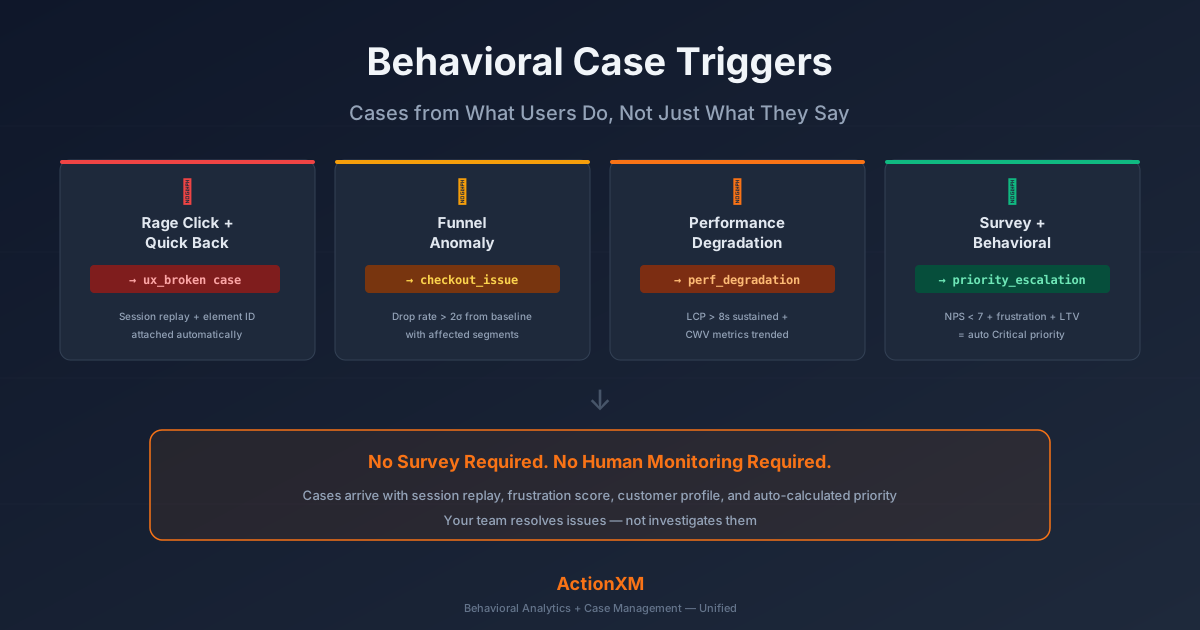
ActionXM takes a different approach. Cases are created from what users do, not just what they say. Behavioral patterns detected by the DXA engine — rage clicks, dead clicks, quick backs, funnel anomalies, performance degradation — automatically generate cases with full context, session replay evidence, and priority auto-calculation.
No survey required. No human monitoring required.
The Four Types of Behavioral Case Triggers
1. Rage Click + Quick Back Pattern → ux_broken Case
When a visitor clicks the same element 3 or more times in rapid succession (rage click), then immediately navigates back to the previous page (quick back), this combination signals a broken or non-responsive UI element.
ActionXM detects this pattern in real time from SDK signals and creates a case with:
- Page URL where the rage click occurred
- Element clicked (identified by Application Genome classification)
- Frustration score for the session
- Session replay link showing the exact moment of frustration
- Device and browser information for reproduction
The CX team doesn’t need to investigate. The session replay shows the exact interaction. Engineering can watch the replay, reproduce the issue, and deploy a fix — often within hours, not weeks.
2. Checkout Funnel Anomaly → checkout_issue Case
ActionXM continuously monitors conversion funnels against established baselines. When the drop rate at any funnel step exceeds 2 standard deviations from the historical baseline, a case is automatically created.
This catches issues that individual session analysis would miss — patterns visible only in aggregate:
- A payment provider outage causing a 40% increase in checkout abandonment
- A new deploy that broke form validation on a specific browser
- A third-party script that slowed page load to the point of abandonment
The case includes:
- Funnel step where the anomaly was detected
- Drop volume compared to baseline
- Affected user segments (device, browser, geography)
- Time of onset (correlated with deploys, incidents, or traffic changes)
- Sample session replays from affected users
3. Performance Degradation → performance_degradation Case
When Core Web Vitals exceed thresholds across multiple sessions — not just an isolated slow load — ActionXM creates a performance case:
- Largest Contentful Paint (LCP) sustained above 8 seconds
- Cumulative Layout Shift (CLS) causing interaction errors
- Interaction to Next Paint (INP) delays beyond acceptable thresholds
The case is routed to the engineering team with:
- CWV metrics trended over time
- Affected pages ranked by impact
- Device and browser breakdown to isolate client-side issues
- Session replays showing the user-visible impact of slow performance
This trigger catches the silent performance problems that users experience but rarely report. A page that loads in 8 seconds doesn’t generate a survey complaint — the user either waits or leaves. Either way, the damage is done. Behavioral monitoring catches it.
4. Combined Behavioral + Survey → Priority Escalation
The most powerful trigger combines both signals. When a customer gives low survey scores and their behavioral data shows frustration, the case is automatically escalated:
| Survey Signal | Behavioral Signal | Customer Value | Priority |
|---|---|---|---|
| NPS 0-3 | Rage clicks + high frustration | High LTV | Critical |
| NPS 4-6 | Some friction signals | Normal | Medium |
| No survey | High frustration score | Any | High |
| NPS 0-3 | No friction signals | Normal | Medium |
The third row is critical: no survey, but clear frustration. This is the case that survey-only platforms can never create. The customer didn’t complain — but their behavior screamed. ActionXM hears it.
The Silent Majority Problem
Every CX program has a silent majority: customers who experience friction, encounter bugs, or struggle with poor performance — and never say a word about it. They don’t fill out surveys. They don’t contact support. They don’t leave reviews. They just quietly disengage.
Research consistently shows that for every customer who complains, there are many more who experienced the same issue and said nothing. In digital experiences, the ratio is even more skewed because the friction of filing a complaint is higher than simply switching to a competitor.
These silent customers are your most dangerous at-risk segment. They’re churning without warning, and your survey-based early warning system can’t see them because they never triggered it.
Behavioral case triggers solve this. Every visitor’s session is monitored for frustration signals. When patterns exceed thresholds, a case is created regardless of whether the customer ever sees a survey. The silent majority becomes visible.
- • Only complainers get attention
- • Delayed by survey collection cycle
- • No video evidence of issue
- • Manual priority assignment
- • Silent churners invisible
- • All frustrated users detected
- • Real-time trigger on behavior
- • Session replay attached
- • Auto-calculated priority
- • Silent majority visible
How Priority Auto-Calculation Works
Traditional case management assigns priority manually. An agent reads the survey comment, makes a judgment call, and tags the case. This is slow, inconsistent, and doesn’t scale.
ActionXM auto-calculates priority by combining three dimensions:
1. Frustration Intensity
The behavioral frustration score (0-100) measures how severe the session friction was. A session with 1 dead click scores low. A session with 6 rage clicks, 2 quick backs, and a CLS-triggered mis-tap scores high.
2. Customer Value
The Experience Graph provides customer value context through unified profiles. A high-LTV enterprise customer hitting the same bug as a free-trial user generates a higher-priority case — automatically.
3. Survey Sentiment (When Available)
If the customer also completed a survey, the NPS/CSAT score is factored in. A behavioral frustration event combined with an NPS of 2 triggers Critical priority. The same behavioral event without survey data triggers High priority — still acted on, just one tier lower.
This three-dimensional priority system ensures that the most impactful cases surface first, without manual triage.
From Detection to Resolution: The Full Workflow
Here’s what happens when a behavioral case trigger fires:
- Detection (Automatic): DXA engine detects a frustration pattern exceeding thresholds
- Case Creation (Automatic): A case is created with full context — page, element, frustration score, session replay, CWV data, customer profile
- Priority Assignment (Automatic): Priority auto-calculated from frustration intensity, customer value, and any available survey data
- Routing (Automatic): Case routed to the appropriate team based on trigger type — UX issues to product, performance to engineering, funnel anomalies to CX
- AI Draft (Automatic): CX Advisor generates a draft response or internal summary based on the case context
- Review and Action (Human): Team member reviews the case, watches the replay, and takes action
- Resolution and Follow-Up: Fix deployed, follow-up micro-survey sent to affected segment
Steps 1 through 5 happen without human involvement. The first human touch is step 6 — reviewing a fully contextualized case with video evidence and a recommended action.
When Behavioral Triggers and Surveys Work Together
The goal isn’t to replace survey-triggered cases. It’s to augment them with behavioral signals so that your case management system catches everything — not just the complaints.
The ideal workflow:
- Behavioral triggers handle detection: they catch issues fast, from 100% of visitors, with no survey required
- Survey responses add depth: when a customer does provide feedback, it enriches the behavioral case with sentiment and qualitative context
- Unified profiles connect both: the Experience Graph links behavioral signals and survey responses to the same customer, creating a complete picture
A case that has both signals — “customer scored NPS 2, and their session replay shows 4 rage clicks on the payment button” — is more actionable than either signal alone. The survey tells you the customer is angry. The replay tells you why. Together, they tell you exactly what to fix and how urgently.
Getting Started with Behavioral Case Triggers
If you’re currently creating cases only from survey responses, here’s how to add behavioral triggers:
Step 1: Enable Frustration Detection
Deploy the ActionXM SDK and enable the DXA engine. Frustration signals — rage clicks, dead clicks, quick backs — are detected automatically. No manual event tagging. The Application Genome classifies page elements and interaction patterns without configuration.
Step 2: Set Trigger Thresholds
Define what frustration level triggers a case. Start conservative:
- Frustration score > 80: Create case (catches the most egregious issues)
- Funnel drop > 2σ: Create case (catches statistically significant anomalies)
- LCP > 8s sustained: Create case (catches performance problems)
You can tune these thresholds down as your team builds capacity to handle the volume.
Step 3: Configure Routing Rules
Map trigger types to teams:
ux_broken→ Product/UX teamcheckout_issue→ Commerce teamperformance_degradation→ Engineering- Combined behavioral + survey → CX team lead
Step 4: Enable CX Advisor Drafts
Turn on AI-drafted responses for behavioral cases. CX Advisor generates internal summaries and customer-facing draft responses based on the case context, saving your team the time of writing from scratch.
Step 5: Monitor and Tune
Review case volumes and resolution rates weekly. Adjust thresholds based on team capacity. Lower thresholds catch more issues but increase volume. Find the balance that works for your organization.
The result: a case management system that catches frustrated customers whether they complain or not. Cases arrive with full context, video evidence, and auto-calculated priority. Your team spends time resolving issues, not investigating them.