The Signal Nobody Tracks
When a user clicks a link, sees the destination page, and immediately hits the back button — that’s not a random event. That’s a frustrated user who didn’t find what they expected.
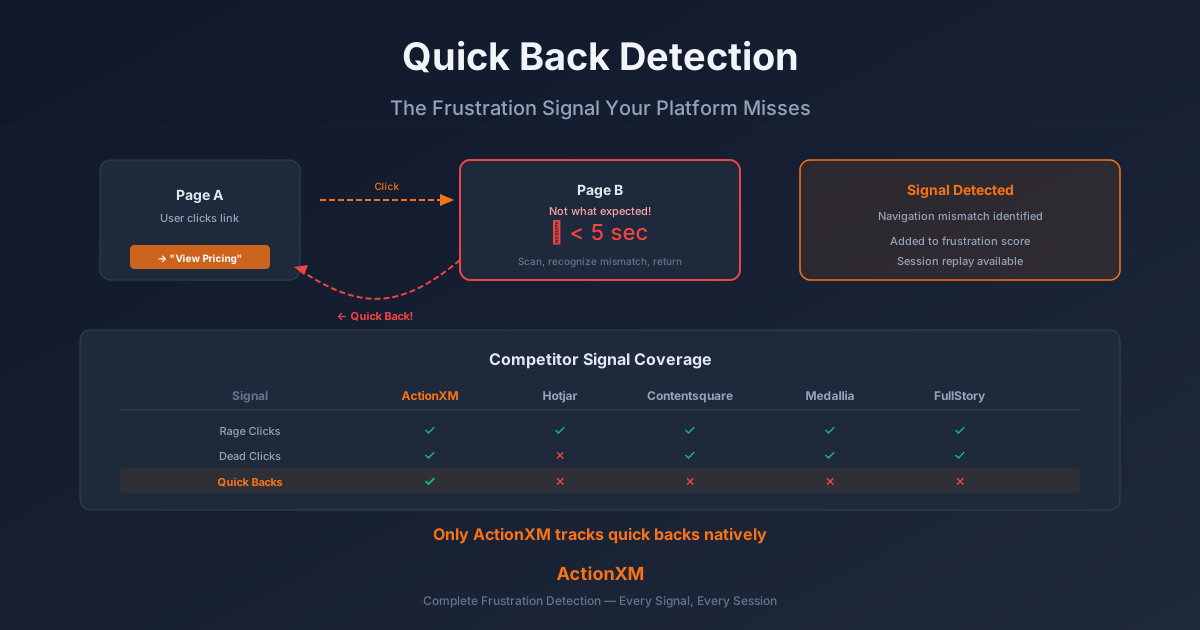
This behavior pattern is called a quick back: navigating to a page and returning within 5 seconds. It happens hundreds of times a day on most websites. And your analytics platform almost certainly doesn’t track it.
Quick backs are one of the highest-signal frustration indicators in behavioral analytics. They capture a specific, actionable failure: the gap between what a user expected from a link or navigation element and what they actually found. Yet among the major digital experience platforms, only ActionXM tracks quick backs natively and incorporates them into frustration scoring.
What Quick Back Detection Captures
A quick back occurs when a user:
- Clicks a link, button, or navigation element
- Arrives at the destination page
- Returns to the previous page within 5 seconds
The 5-second threshold is significant. It’s enough time to scan a page and confirm it’s wrong, but not enough time to meaningfully engage with content. A user who returns after 2 seconds saw the headline and knew instantly the page wasn’t what they wanted. A user who returns after 4 seconds scanned the opening content and confirmed the mismatch.
Quick backs are distinct from bounces:
| Metric | What It Measures | Signal |
|---|---|---|
| Bounce rate | Single-page sessions | User left the site |
| Quick back | Navigate forward then immediately return | User expected something different |
| Exit rate | Last page in a session | User finished or gave up |
Bounces tell you someone left. Quick backs tell you why they navigated and were disappointed. That’s a fundamentally different and more actionable signal.
Why Quick Backs Happen
Quick backs reveal specific UX failures. Each occurrence points to a concrete, fixable problem:
Misleading Navigation Labels
A menu item says “Pricing” but leads to a page about enterprise plans with no visible pricing table. Users click, see no prices, and immediately return. The navigation label promised something the page doesn’t deliver.
Confusing Search Results
A site search returns results that look relevant based on titles but don’t match the query intent. Users click the top result, realize it’s about a different topic, and return to try the next result. Each click-and-return is a quick back.
Wrong Content Behind CTAs
A “Learn More” button on a product card leads to a generic feature page instead of the specific product details the user expected. The CTA implied specificity; the destination delivered generality.
Broken Information Architecture
A category page includes items that don’t belong. Users browse the category, click an item that appears to match their search, discover it’s miscategorized, and return. The IA structure misled them.
Outdated or Stale Content
A search result or internal link leads to content that’s clearly outdated — old dates, discontinued products, irrelevant references. Users quickly recognize the content isn’t current and return.
The Frustration Score: Where Quick Backs Fit
ActionXM combines multiple behavioral signals into a per-session frustration score. Each signal type is weighted based on its correlation with negative outcomes:
Quick backs carry a lower weight than rage clicks (which indicate active frustration with a broken element) but provide a unique signal that no other behavioral metric captures: expectation mismatch in navigation.
A session with 3 rage clicks on a broken button is clearly frustrated. A session with 5 quick backs is clearly confused. Both matter, but they point to different problems requiring different fixes.
Competitor Signal Coverage
One of the most significant gaps in the behavioral analytics market is quick back tracking. Here’s what each major platform captures:
| Signal | ActionXM | Hotjar | Contentsquare | Medallia | FullStory |
|---|---|---|---|---|---|
| Rage Clicks | Yes | Yes | Yes | Yes (composite) | Yes |
| Dead Clicks | Yes | No | Yes | Yes (composite) | Yes |
| Quick Backs | Yes | No | No | No | No |
| Core Web Vitals | Yes | No | Yes | Partial | Yes |
| Frustration Score | Yes (composite) | No | Yes (CS Score) | Yes (composite) | Yes (Frustration Signal) |
ActionXM is the only platform that tracks quick backs as a distinct behavioral signal and incorporates them into frustration scoring. Other platforms may detect page-level engagement metrics (time on page, scroll depth), but they don’t specifically identify the navigate-and-return pattern as a frustration signal.
This gap matters because quick backs reveal problems that other signals miss. A page with zero rage clicks and zero dead clicks can still have a high quick-back rate — meaning the page content is fine, but the navigation leading to it is broken.
Five Quick Back Patterns and What They Tell You
Pattern 1: High Quick-Back Rate from Search Results
What you see: Users click search results and return to the results page within seconds at an above-average rate.
What it means: Search relevance is poor. Results look right based on titles but don’t match query intent. The search algorithm is optimizing for keyword match rather than intent match.
Fix: Review the top quick-backed search queries. Examine what users expected vs. what they found. Improve search relevance algorithms or add better meta descriptions to help users preview content before clicking.
Pattern 2: Quick Backs from Category Navigation
What you see: Users browse a product category, click into specific products, and immediately return — repeatedly across the category.
What it means: Products are miscategorized, or the category view doesn’t provide enough information for users to distinguish between items. They’re clicking to learn what each item is, finding it’s not what they want, and returning.
Fix: Add more preview information to category listings (better thumbnails, price, key specs). Review categorization for accuracy. Consider adding filters to help users narrow within the category.
Pattern 3: Quick Backs from Footer/Header Links
What you see: Users click footer or header navigation links and quickly return to the page they were on.
What it means: Navigation labels don’t match destination content. Users expected “About” to mean company story but found a corporate boilerplate page. Or they expected “Resources” to mean documentation but found marketing whitepapers.
Fix: Audit navigation labels against actual page content. Rename labels to accurately describe destinations. Consider adding sub-navigation or hover previews.
Pattern 4: Quick Backs Concentrated on Mobile
What you see: Quick-back rates are significantly higher on mobile than desktop for the same pages.
What it means: Tap targets are too close together, causing accidental navigation. Or mobile page rendering makes content appear different from what the link promised (truncated previews, missing images, different layout).
Fix: Increase tap target spacing on mobile. Test link text and previews specifically in mobile viewport. Ensure destination pages render properly on mobile devices.
Pattern 5: Quick Backs After a Redesign
What you see: Quick-back rates spike across the site after a navigation or information architecture change.
What it means: Existing users have learned where things are and the redesign broke their mental model. Links they used to click for one purpose now lead somewhere unexpected.
Fix: Monitor quick-back patterns closely after any navigation change. Consider progressive disclosure or onboarding for significant IA changes. Use quick-back data to identify the specific navigation paths that need adjustment.
Acting on Quick Back Data
Quick back data is only valuable if you act on it. Here’s a practical workflow:
Step 1: Identify High Quick-Back Pages
Run a report showing pages ranked by quick-back rate (quick backs from the page / total navigations from the page). Focus on pages with both high rates and high traffic — these are your biggest opportunities.
Step 2: Analyze Source Navigation
For each high quick-back page, identify where users came from before the quick back. This reveals which navigation elements or links are misleading users.
Step 3: Watch Session Replays
Review session replays from quick-back sessions. Watch what users do in the seconds between arrival and return. Do they scroll? Do they read the headline and immediately leave? Do they look at something specific?
Step 4: Fix the Mismatch
Based on the pattern, fix either:
- The link/navigation label (if the destination content is correct but the label is misleading)
- The destination content (if the label is accurate but the page doesn’t deliver what it promises)
- The information architecture (if the navigation structure itself is confusing)
Step 5: Measure Improvement
After fixing, monitor the quick-back rate for the affected pages. A successful fix shows a measurable decline in quick backs from the specific navigation path you corrected.
Why This Signal Matters for CX Programs
Quick backs sit at the intersection of three CX concerns:
Findability: Can users find what they’re looking for? High quick-back rates on search results and category pages say no.
Content-Navigation Fit: Does the navigation accurately describe the content? Quick backs from misleading labels reveal a disconnect between what users expect and what they find.
Information Architecture: Is the site organized in a way that makes sense to users? Quick backs across multiple categories suggest the organization model doesn’t match user mental models.
These are the problems that surveys rarely surface. A customer doesn’t say “your navigation labels are misleading” in an NPS survey. They say “the site is hard to use” or just score low without explanation. Quick back data tells you exactly which navigation elements are causing confusion and which pages are failing to meet expectations.
Getting Started
ActionXM tracks quick backs automatically through the DXA engine. No manual configuration required. Once the SDK is deployed, quick back events are captured from every session and incorporated into the frustration score.
To start using quick back data:
- Enable the Quick Back report in your ActionXM dashboard to see pages ranked by quick-back rate
- Set alerts for pages where quick-back rates exceed your baseline threshold
- Review replays of quick-back sessions to understand the specific navigation failures
- Track trends over time to measure the impact of navigation and content improvements
Every quick back is a micro-failure in your user experience — a moment where a user expected one thing and got another. The platforms that track this signal can fix these failures. The platforms that don’t are flying blind on one of the most actionable behavioral metrics available.