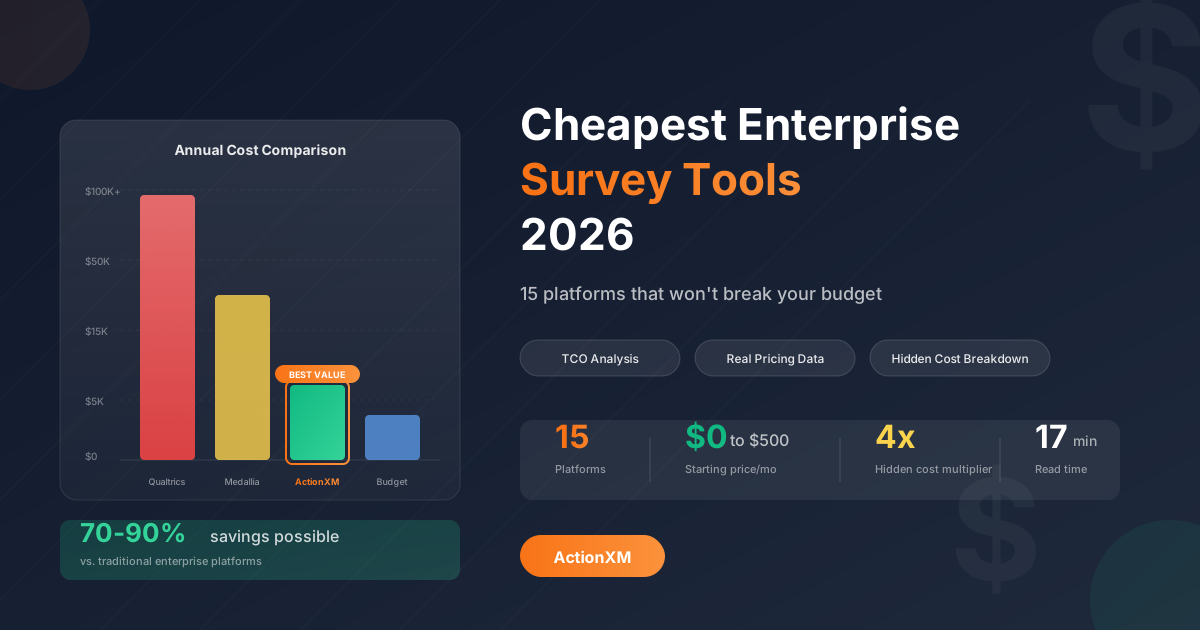
Here’s an uncomfortable truth about enterprise survey software: the sticker price is rarely what you actually pay. That $27,000 Qualtrics quote? It doesn’t include implementation ($15,000–$50,000), training ($5,000–$15,000), or the consultant you’ll hire when your team can’t figure out the analytics ($10,000+).
The real cost of “enterprise” survey tools often lands 2–4x higher than the initial quote. And for many organizations, that investment never delivers proportional value.
But here’s the opportunity: a new generation of survey platforms delivers enterprise-grade features—AI analytics, closed-loop automation, multi-channel distribution—at a fraction of traditional costs. The survey software market has matured, and budget-conscious buyers have more power than ever.
This guide cuts through the pricing complexity to reveal which platforms actually deliver enterprise capabilities at accessible price points—and how to calculate the true cost of any survey tool you’re considering.
The Real Cost of Survey Software (Beyond the License Fee)
Before comparing platforms, let’s establish a framework for true cost comparison.
The TCO Iceberg: What’s Hidden Below the Surface
According to CIO’s TCO analysis, hidden costs can inflate total ownership by 200–400% compared to initial vendor quotes. This isn’t unique to survey software—it’s endemic to enterprise software. But it means the “cheapest” option on paper may not be the cheapest in practice.
The Five Cost Categories Most Buyers Miss
1. Implementation & Configuration (20–40% of license cost) Enterprise platforms like Qualtrics and Medallia typically require 12–16 weeks for full deployment. Industry research shows mid-market implementations average 6–8 weeks and 100–200 hours of internal time.
2. Training & Change Management (15–25% of license cost) Complex platforms demand ongoing training investment. As users change and vendors add features, training becomes a perpetual line item—not a one-time expense.
3. Integration Development (Variable, often $10,000–$50,000) Connecting survey data to your CRM, support tools, or data warehouse often requires custom API work, middleware, or third-party services that must be maintained across system updates.
4. Customization & Upgrades (10–20% annually) Custom workflows, branded surveys, and specialized reports break during vendor upgrades. Each new release requires testing, fixes, and potential redevelopment.
5. Productivity Loss During Transition Internal teams redirected to implementation, testing, and training can’t do their normal work. For a 100-person company, typical TCO ranges $15,000–$25,000 annually including these soft costs.
Price-to-Value Matrix: Finding the Sweet Spot
Not every organization needs the same capabilities. This matrix maps platform cost against functionality to identify where your needs intersect with your budget.
Enterprise Survey Tool Positioning Map
<!-- Quadrant 1: High Cost, High Capability -->
<div style="background: linear-gradient(135deg, #fef2f2 0%, #fecaca 100%); padding: 1.25rem; border-radius: 12px 4px 4px 4px; border: 2px solid #f87171; min-height: 140px;">
  <div style="font-weight: 700; color: #b91c1c; font-size: 0.8rem; text-transform: uppercase; letter-spacing: 0.05em; margin-bottom: 0.5rem;">💰 Premium Enterprise</div>
  <div style="font-size: 0.75rem; color: #991b1b; margin-bottom: 0.75rem;">$50K–$500K+/year</div>
  <div style="display: flex; flex-wrap: wrap; gap: 0.35rem;">
    <span style="background: #fca5a5; color: #7f1d1d; padding: 0.2rem 0.5rem; border-radius: 4px; font-size: 0.7rem; font-weight: 500;">Qualtrics</span>
    <span style="background: #fca5a5; color: #7f1d1d; padding: 0.2rem 0.5rem; border-radius: 4px; font-size: 0.7rem; font-weight: 500;">Medallia</span>
    <span style="background: #fca5a5; color: #7f1d1d; padding: 0.2rem 0.5rem; border-radius: 4px; font-size: 0.7rem; font-weight: 500;">InMoment</span>
  </div>
</div>

<!-- Quadrant 2: Low Cost, High Capability - THE SWEET SPOT -->
<div style="background: linear-gradient(135deg, #f0fdf4 0%, #86efac 100%); padding: 1.25rem; border-radius: 4px 12px 4px 4px; border: 3px solid #22c55e; min-height: 140px; position: relative;">
  <div style="position: absolute; top: -10px; right: 10px; background: #16a34a; color: white; font-size: 0.65rem; padding: 0.2rem 0.6rem; border-radius: 10px; font-weight: 700;">BEST VALUE</div>
  <div style="font-weight: 700; color: #166534; font-size: 0.8rem; text-transform: uppercase; letter-spacing: 0.05em; margin-bottom: 0.5rem;">✓ Smart Enterprise</div>
  <div style="font-size: 0.75rem; color: #15803d; margin-bottom: 0.75rem;">$1K–$15K/year</div>
  <div style="display: flex; flex-wrap: wrap; gap: 0.35rem;">
    <span style="background: #4ade80; color: #166534; padding: 0.2rem 0.5rem; border-radius: 4px; font-size: 0.7rem; font-weight: 600;">ActionXM</span>
    <span style="background: #86efac; color: #166534; padding: 0.2rem 0.5rem; border-radius: 4px; font-size: 0.7rem; font-weight: 500;">Alchemer</span>
    <span style="background: #86efac; color: #166534; padding: 0.2rem 0.5rem; border-radius: 4px; font-size: 0.7rem; font-weight: 500;">Zonka</span>
    <span style="background: #86efac; color: #166534; padding: 0.2rem 0.5rem; border-radius: 4px; font-size: 0.7rem; font-weight: 500;">QuestionPro</span>
  </div>
</div>

<!-- Quadrant 3: High Cost, Low Capability -->
<div style="background: linear-gradient(135deg, #fefce8 0%, #fde047 100%); padding: 1.25rem; border-radius: 4px 4px 4px 12px; border: 2px solid #facc15; min-height: 140px;">
  <div style="font-weight: 700; color: #a16207; font-size: 0.8rem; text-transform: uppercase; letter-spacing: 0.05em; margin-bottom: 0.5rem;">⚠️ Overpriced Simple</div>
  <div style="font-size: 0.75rem; color: #92400e; margin-bottom: 0.75rem;">$5K–$20K/year</div>
  <div style="display: flex; flex-wrap: wrap; gap: 0.35rem;">
    <span style="background: #fde047; color: #78350f; padding: 0.2rem 0.5rem; border-radius: 4px; font-size: 0.7rem; font-weight: 500;">Typeform Business</span>
    <span style="background: #fde047; color: #78350f; padding: 0.2rem 0.5rem; border-radius: 4px; font-size: 0.7rem; font-weight: 500;">GetFeedback</span>
  </div>
  <div style="font-size: 0.7rem; color: #a16207; margin-top: 0.5rem; font-style: italic;">High price, limited analytics</div>
</div>

<!-- Quadrant 4: Low Cost, Low Capability -->
<div style="background: linear-gradient(135deg, #f1f5f9 0%, #cbd5e1 100%); padding: 1.25rem; border-radius: 4px 4px 12px 4px; border: 2px solid #94a3b8; min-height: 140px;">
  <div style="font-weight: 700; color: #475569; font-size: 0.8rem; text-transform: uppercase; letter-spacing: 0.05em; margin-bottom: 0.5rem;">📋 Basic Tools</div>
  <div style="font-size: 0.75rem; color: #64748b; margin-bottom: 0.75rem;">Free–$1K/year</div>
  <div style="display: flex; flex-wrap: wrap; gap: 0.35rem;">
    <span style="background: #e2e8f0; color: #334155; padding: 0.2rem 0.5rem; border-radius: 4px; font-size: 0.7rem; font-weight: 500;">Google Forms</span>
    <span style="background: #e2e8f0; color: #334155; padding: 0.2rem 0.5rem; border-radius: 4px; font-size: 0.7rem; font-weight: 500;">Microsoft Forms</span>
    <span style="background: #e2e8f0; color: #334155; padding: 0.2rem 0.5rem; border-radius: 4px; font-size: 0.7rem; font-weight: 500;">SurveyMonkey Basic</span>
  </div>
  <div style="font-size: 0.7rem; color: #64748b; margin-top: 0.5rem; font-style: italic;">Good for simple needs</div>
</div>The “Smart Enterprise” quadrant represents the 2026 opportunity: platforms that have matured to deliver sophisticated features—AI analytics, automation, CRM integration—without the six-figure price tags that defined the category five years ago.
Quick Comparison: 15 Budget-Friendly Enterprise Survey Tools
| Platform | Best For | Starting Price | Enterprise Tier | Key Budget Advantage |
|---|---|---|---|---|
| ActionXM | Mid-market CX/EX | Transparent | Included | No per-response fees, AI included |
| Alchemer | Research teams | $55/user/mo | ~$10K/yr | Unlimited responses |
| Zonka Feedback | Closed-loop CX | $79/mo | $429/mo | Regional hosting included |
| QuestionPro | Versatile research | $99/mo | Custom | 80% features at 50% cost |
| SurveySparrow | High response rates | $19/mo | $499/mo | Conversational format |
| Jotform Enterprise | Form-based surveys | $99/mo (Gold) | Custom | Unlimited forms |
| SurveyMonkey Teams | Simple collaboration | $25/user/mo | Custom | Wide recognition |
| Survicate | Digital teams | Free–$99/mo | Custom | Generous free tier |
| SurveySensum | AI on a budget | Free tier | $299/mo | AI analytics included |
| forms.app | Budget startups | $25/mo | $99/mo | 100K responses at $99 |
| SurveyPlanet | Small teams | $20/mo | $350/yr | AI survey creation |
| Pollfish | Market research | $0.95/response | Unlimited seats | Pay only for responses |
| Typeform | Engaging surveys | $29/mo | $499/mo | Beautiful design |
| Formbricks | Privacy-first | Free (OSS) | Self-host | Complete data control |
| Nicereply | Support teams | $59/mo | $359/mo | Help desk integration |
Detailed Reviews: Best Value Enterprise Survey Tools
1. ActionXM — Best Overall Value for Growing Organizations
Why it delivers enterprise value at accessible pricing: ActionXM was built for the “Smart Enterprise” quadrant—organizations that need sophisticated capabilities without paying Qualtrics prices. The platform includes AI-powered sentiment analysis, predictive analytics, and closed-loop automation as standard features, not expensive add-ons.
Cost Advantage Breakdown
What’s included without extra fees:
- AI-powered sentiment analysis and theme detection
- Automated closed-loop workflows
- Unified CX and EX in one platform
- Native CRM integrations (Salesforce, HubSpot)
- Dedicated customer support
- Unlimited survey responses
Best for: Organizations seeking Qualtrics-level insights at mid-market pricing, with the flexibility to start small and scale without platform migration.
Calculate your savings: Request a custom quote and see the total cost comparison for your specific needs.
2. Alchemer — Best Value for Research Flexibility
Overview: Alchemer (formerly SurveyGizmo) delivers research-grade survey capabilities—43+ question types, advanced logic, statistical analysis—at roughly 50–70% less than Qualtrics for comparable functionality.
Pricing Reality
| Tier | Monthly Cost | What You Get |
|---|---|---|
| Collaborator | $55/user | Advanced surveys, unlimited responses |
| Professional | $165/user | Full analytics, API access |
| Full Access | $275/user | All features, custom domains |
| Enterprise | ~$10K–$15K/yr | Dedicated support, SSO, custom |
Cost advantages:
- No per-response fees: Unlike many competitors, Alchemer doesn’t charge for survey completions
- Unlimited surveys and questions: No artificial limits on program scale
- Transparent tiers: Clear feature differentiation without sales negotiation
- Self-service scaling: Add users without renegotiating contracts
Limitations:
- UI less modern than newer competitors
- Requires technical skill to unlock full value
- Enterprise features need custom pricing
Best for: Research teams who need maximum survey flexibility without paying Qualtrics rates.
3. Zonka Feedback — Best Value for Closed-Loop Automation
Overview: Zonka Feedback delivers AI-powered closed-loop workflows at mid-market pricing. Where competitors charge extra for automation, Zonka includes it in standard tiers.
Pricing Structure
Value-packed features:
- AI text analysis and sentiment detection standard
- Automated response workflows based on scores
- Multi-channel: email, SMS, WhatsApp, web, in-app, kiosks
- Regional data hosting (US, EU, Australia, India) included
- GDPR, HIPAA, ISO 27001 compliance
Why it’s budget-friendly: Zonka includes closed-loop automation at every paid tier. Competitors like Qualtrics and Medallia charge premium prices for comparable workflow capabilities.
Best for: Growing businesses wanting enterprise-grade CX automation at accessible prices.
4. QuestionPro — Best Value for All-Purpose Research
Overview: QuestionPro claims to deliver “80% of Qualtrics functionality at 50% of the cost”—and user reviews largely support this positioning. The platform serves everyone from students to Fortune 100 companies.
Pricing Tiers
| Tier | Starting Price | Target User |
|---|---|---|
| Essentials | Free | Students, individuals |
| Advanced | $99/mo | SMBs, consultants |
| Teams | Custom | Collaborative teams |
| Research Suite | Custom | Enterprise research |
Budget advantages:
- Genuinely useful free tier: Not just a demo, but a working research tool
- Pay-per-response option: For occasional research needs
- 15% annual discount: Significant savings on committed plans
- All compliance included: GDPR, HIPAA, SOC 2, ISO 27001 standard
Enterprise features at mid-market prices:
- Advanced analytics including MaxDiff and Conjoint
- AI-powered insights
- Salesforce, HubSpot, and Tableau integrations
- Custom branding and white-labeling
Limitations:
- Annual commitment required
- Research Suite pricing not transparent
- Learning curve for advanced features
Best for: Organizations wanting enterprise research capabilities with flexible pricing options.
5. SurveySparrow — Best Value for Response Rate ROI
Overview: SurveySparrow bet that conversational surveys would outperform traditional forms—and the data backs them up. Their chat-like interface achieves 40% higher completion rates, which translates directly to lower cost-per-response.
How Higher Response Rates = Lower Costs
Pricing breakdown:
| Plan | Monthly | Responses/Year | Key Features |
|---|---|---|---|
| Free | $0 | 75/quarter | Basic conversational |
| Basic | $19 | 2,500 | Templates, embedding |
| Starter | $39 | More | Integrations |
| Business | $79 | 50,000 | Workflows, 3 users |
| Professional | $249 | 100,000 | AI, HIPAA, 5 users |
| Enterprise | $499+ | Custom | Full platform |
Best for: Organizations where survey fatigue is killing response rates—the higher completion rate delivers better ROI than cheaper tools with lower engagement.
6. Jotform Enterprise — Best Value for Form-Based Surveys
Overview: Jotform started as a form builder but evolved into a capable survey platform. For organizations that need forms + surveys in one tool, Jotform eliminates redundant subscriptions.
Pricing Progression
| Plan | Monthly | Forms | Submissions | Storage |
|---|---|---|---|---|
| Free | $0 | 5 | 100/mo | 100 MB |
| Bronze | $34 | 25 | 1,000/mo | 1 GB |
| Silver | $39 | 50 | 2,500/mo | 10 GB |
| Gold | $99 | 100 | 100,000/mo | 100 GB |
| Enterprise | Custom | Unlimited | Unlimited | Unlimited |
Budget advantages:
- Generous Gold tier: 100,000 monthly submissions at $99/month is exceptional value
- No per-response fees: Unlimited within tier limits
- HIPAA compliance at Gold tier (not enterprise-only)
- Educational and nonprofit discounts available
Enterprise features:
- SSO and user access controls
- Custom domains and branding
- HIPAA and GDPR compliance
- Dedicated support
Limitations:
- Less sophisticated analytics than dedicated CX platforms
- Survey logic less advanced than specialists
- Multi-user access only at Enterprise tier
Best for: Organizations needing combined forms and surveys without multiple subscriptions.
7. SurveyMonkey Teams — Best Value for Simplicity
Overview: SurveyMonkey remains the most recognized survey brand globally. For teams wanting proven reliability without complexity, the Teams tier delivers collaborative features at reasonable per-user pricing.
Team Pricing
| Plan | Per User/Month | Key Features |
|---|---|---|
| Team Advantage | $25 | Unlimited surveys, shared templates |
| Team Premier | $75 | White-label, advanced analysis |
| Enterprise | Custom | SSO, HIPAA, dedicated CSM |
Value proposition:
- Zero learning curve: Nearly everyone knows how to use SurveyMonkey
- AI Survey Builder: Generate surveys from prompts (new in 2026)
- 200+ integrations: Salesforce, Slack, Tableau
- 70+ language support: Global deployment ready
Hidden costs to watch:
- Per-seat pricing adds up quickly for larger teams
- Advanced analytics require Premier tier
- Enterprise features need custom negotiation
When it’s the right choice: For teams who value simplicity over sophistication and want surveys running today, not next month.
8. Survicate — Best Free Tier for Growing Teams
Overview: Survicate offers arguably the most useful free tier in the survey industry—25 responses/month with real features, not a crippled demo. For startups and growing teams, it provides a genuine path from free to paid.
Growth-Friendly Pricing
Free tier includes:
- Website, in-app, and email surveys
- Basic targeting rules
- Core integrations (limited)
- AI-powered categorization
Paid tier value adds:
- Event-triggered surveys
- 40+ native integrations (HubSpot, Braze, Amplitude)
- Advanced targeting
- Priority support
Best for: Digital-first companies wanting to start free and scale spend as value is proven.
9. Pollfish — Best Value for Pay-Per-Response Model
Overview: Pollfish inverts the typical pricing model: instead of monthly fees with response limits, you pay only for the responses you collect. For irregular research needs, this can deliver significant savings.
Response-Based Pricing
| Factor | Cost |
|---|---|
| Base response | $0.95 |
| Each targeting filter | +$0.55 |
| Unlimited user seats | Included |
| Survey creation tools | Included |
When pay-per-response wins:
Advantages:
- No wasted spend during quiet months
- Access to Pollfish’s global respondent panel
- Dynamic pricing calculator shows costs upfront
- Unlimited team members at no extra cost
Limitations:
- Gets expensive at high volume
- Less suited for ongoing CX programs
- Own-audience surveys still incur costs
Best for: Organizations with irregular research needs or who want access to Pollfish’s respondent panel without panel management.
10. Formbricks — Best Value for Data Sovereignty
Overview: Formbricks offers something unique: an open-source survey platform you can self-host for free. For organizations with strict data control requirements, it eliminates both licensing costs and compliance concerns.
Cost Model: Self-Host = Zero License Fees
| Cost Category | Cloud Survey Tools | Formbricks Self-Hosted |
|---|---|---|
| Software license | $1,200–$100,000+/year | $0 |
| Data hosting | Vendor-controlled | Your infrastructure |
| Response limits | Typically capped | Unlimited |
| Customization | Limited/extra cost | Unlimited |
| Vendor lock-in | High | Zero |
| Ongoing cost | Subscription | Hosting only (~$20–$100/mo) |
What self-hosting provides:
- Complete data sovereignty and GDPR compliance by design
- Unlimited surveys, responses, and users
- Full source code access for customization
- No vendor dependency or renewal negotiations
- React component library for developers
Requirements:
- Technical capacity for deployment and maintenance
- Infrastructure management (or simple cloud hosting)
- Willingness to manage updates
Cloud option available: If self-hosting isn’t practical, Formbricks offers cloud plans starting free.
Best for: Privacy-focused organizations with developer resources who want complete control.
11-15. Additional Budget-Friendly Options
11. SurveySensum — AI on a Budget
- Free tier with 25 responses/month
- AI text analytics included at accessible pricing
- Strong for teams wanting AI capabilities without enterprise costs
- Pricing starts at $299/mo for full features
12. forms.app — Maximum Responses per Dollar
- Basic plan: $25/month
- Top tier: $99/month for 100,000 responses
- Excellent for high-volume, simple surveys
- Best value for response volume
13. SurveyPlanet — Small Team Efficiency
- Pro Plan: $20/month or $180/year
- Enterprise: $350/year for team collaboration
- AI survey creation included
- Budget-friendly for startups
14. Nicereply — Support Team Specialist
- Starts at $59/month (100 responses, 3 users)
- All integrations included (no feature gating)
- Native Zendesk, Freshdesk, Intercom integration
- Purpose-built for CSAT
15. Typeform Basic — Engagement First
- Basic plan: $29/month for 100 responses
- Beautiful, high-conversion surveys
- Limited analytics depth
- When design matters most
Budget Decision Framework
By Organization Size
By Primary Use Case
| Use Case | Budget Pick | Mid-Tier Pick | Premium Pick |
|---|---|---|---|
| NPS/CSAT Programs | Survicate | Zonka Feedback | ActionXM |
| Market Research | QuestionPro Free | Alchemer | QuestionPro Research Suite |
| Employee Engagement | SurveySparrow | ActionXM | Culture Amp |
| Support Feedback | Nicereply | SurveyMonkey Teams | ActionXM |
| Product Feedback | Formbricks | Survicate | Hotjar |
| High-Volume Surveys | forms.app | Jotform | Pollfish |
TCO Calculation Checklist
Before committing to any platform, estimate your true Year 1 cost:
| Cost Category | Estimate | Notes |
|---|---|---|
| Annual license | $_______ | Per quoted pricing |
| × Number of users | _______ | If per-seat pricing |
| Implementation | $_______ | Vendor estimate + internal time |
| Training hours × $50/hr | $_______ | Include ongoing training |
| Integration development | $_______ | Custom API work needed? |
| Productivity loss (hours × $50) | $_______ | Team time during transition |
| Year 1 Total | $_______ | Compare this, not list price |
Frequently Asked Questions
What’s the cheapest enterprise survey tool overall?
For true enterprise features (AI analytics, closed-loop automation, compliance, unlimited users), Zonka Feedback at $79–$429/month and ActionXM with transparent pricing offer the best value. For basic surveys without enterprise needs, Survicate’s free tier or forms.app at $25/month provide functional starting points.
How much should we budget for enterprise survey software?
Based on industry benchmarks:
- SMB platforms: $1,500–$4,000 annually
- Mid-market: $4,000–$12,000 annually
- Enterprise: $15,000–$40,000+ annually
Add 50–100% for implementation, training, and internal labor to get true TCO.
Is free survey software good enough for business use?
For simple needs, yes. Google Forms, Microsoft Forms, and free tiers from Survicate or QuestionPro handle basic surveys effectively. For business-critical CX programs, probably not. Free tools typically lack automation, advanced analytics, integrations, and compliance certifications that enterprise needs require.
Can budget tools really replace Qualtrics or Medallia?
For 80% of use cases, yes. Platforms like ActionXM, Alchemer, and Zonka Feedback deliver comparable functionality at 70–90% lower TCO. Where premium platforms win: extremely complex research methodologies (MaxDiff, conjoint), massive multi-national deployments, and organizations with unlimited budgets and dedicated research teams.
What hidden costs should I watch for?
- Per-response fees that escalate with volume
- Per-seat pricing that adds up with team growth
- Implementation services quoted separately
- Integration development for custom connections
- Training time for complex platforms
- Annual escalators built into contracts
Which cheap survey tool has the best AI features?
ActionXM includes AI-powered sentiment analysis and theme detection as standard features. SurveySensum offers AI text analytics at budget pricing. Zonka Feedback provides AI analysis starting at $99/month.
The Bottom Line
The survey software market in 2026 offers a clear opportunity: enterprise-grade capabilities at mid-market prices. The platforms that dominated a decade ago—Qualtrics, Medallia—still serve large enterprises with unlimited budgets. But for everyone else, better options exist.
If you want the best value overall: ActionXM delivers AI-powered insights, closed-loop automation, and unified CX/EX without the complexity or six-figure price tags of traditional enterprise platforms.
If you want maximum survey flexibility: Alchemer offers research-grade capabilities with transparent pricing and no per-response fees.
If you want to start free and grow: Survicate or SurveySensum provide genuine utility at no cost, with clear upgrade paths as needs expand.
If you want to pay only for what you use: Pollfish’s per-response model eliminates waste for irregular research needs.
If you want complete data control: Formbricks’ open-source option eliminates licensing costs entirely.
The “cheapest” survey tool isn’t necessarily the one with the lowest sticker price—it’s the one that delivers the best return on your total investment. Calculate TCO, not just list price. Evaluate implementation complexity, not just features. And choose a platform that grows with you without requiring migration.
Find Your Best-Value Survey Platform
Stop overpaying for survey software. ActionXM helps organizations of all sizes capture and act on feedback with enterprise capabilities at accessible pricing—no hidden fees, no per-response charges, no six-month implementations.
Take the next step:
Questions about survey software pricing? Talk to our team—we’ll help you calculate the true cost of any platform you’re considering.
Sources
- CIO - Calculating Total Cost of Ownership for Enterprise Software
- InfluenceFlow - Employee Feedback Survey Platforms 2026 Guide
- Pollfish - 6 Best Enterprise Survey Software in 2026
- The CX Lead - 22 Best Enterprise Survey Software For 2026
- Zonka Feedback - 17 Best Qualtrics Alternatives
- SurveySensum - 17 Best Qualtrics Competitors
- Polling.com - Pricing Plans for Survey Tools in 2026
- Alchemer - Plans and Pricing
- SurveyMonkey - Enterprise Pricing
- Typeform - Plans & Pricing
- QuestionPro - Plans and Pricing
- Jotform - Pricing
- SurveySparrow - Pricing
- Zonka Feedback - Pricing
- G2 - Survey Software Pricing Comparisons