Your last survey had a 6% response rate. You sent 10,000 emails, watched the analytics obsessively, and got back 600 responses—barely enough to draw meaningful conclusions.
Sound familiar? You’re not alone. According to Delighted’s 2024 analysis, email surveys average just 6% response rates. Compare that to in-app surveys at 40%+ or SMS at 45-60%, and it’s clear: email surveys are fighting an uphill battle.
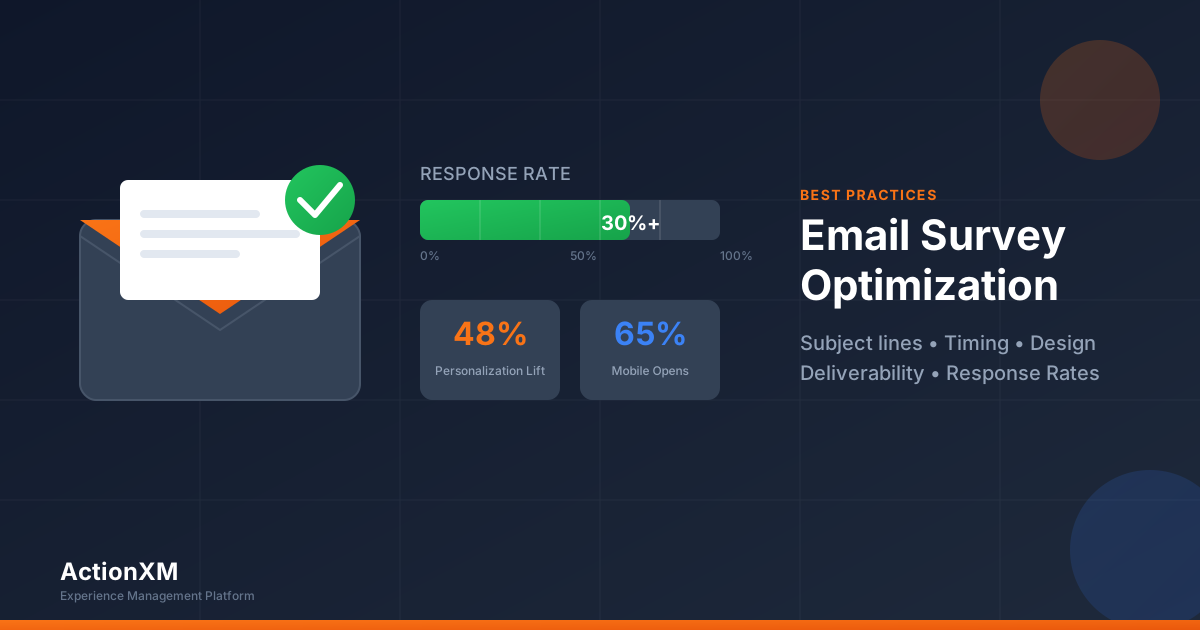
But here’s what makes this fixable: the gap between average performers (6%) and top performers (30%+) isn’t about luck. It’s about execution. The difference comes down to subject lines, timing, design, and deliverability—all elements within your control.
This guide breaks down the research-backed tactics that separate survey emails that get deleted from ones that get completed.
The Email Survey Reality Check: 2026 Benchmarks
Before optimizing anything, you need to know where you stand. Email survey response rates vary dramatically by type, audience, and industry.
The Declining Response Rate Trend
Here’s the uncomfortable truth: email survey response rates have been declining steadily. According to Clootrack’s 2025 research, response rates have slipped by 1-2 percentage points per year since 2019. Email completions that averaged 28% pre-pandemic now hover near 22%.
| Year | Average Email Survey Response Rate |
|---|---|
| 2019 | 28% |
| 2021 | 25% |
| 2023 | 23% |
| 2025 | 22% |
| Trend | -1.5% per year |
The culprit? Survey fatigue is real. Optimove’s 2025 research found that 70% of respondents unsubscribed from at least 3 brands in the last 3 months due to message overload. For email specifically, 37% find it the most annoying channel when overwhelmed.
Subject Lines: Your 3-Second Window
Here’s a sobering statistic: 64% of recipients decide to open an email based on the subject line alone, according to Salesgenie research. Even more alarming? 69% will mark an email as spam based solely on the subject line.
Your subject line isn’t just important—it’s everything.
High-Performing Subject Line Examples
Based on HubSpot’s survey email research, here are formats that consistently perform well:
Personalization-focused:
- “[FirstName], help us improve your experience”
- “Your opinion matters, [FirstName]”
- “A quick question about your recent order, [FirstName]”
Time-bound:
- “Quick 2-minute survey about your experience”
- “30 seconds to share your feedback?”
- “Your feedback (takes less than 2 minutes)”
Value-exchange:
- “Help us serve you better”
- “Your ideas shape what’s next”
- “We’re listening—share your thoughts”
Question-based:
- “How did we do?”
- “Did we meet your expectations?”
- “One quick question about your experience”
The Sender Name Advantage
Don’t overlook your “From” name. Moosend research reveals that 42% of email users look at the sender name first when deciding whether to open an email.
| Sender Type | Open Rate Impact |
|---|---|
| Person’s name (e.g., “Sarah from Acme”) | +27.5% vs company name |
| Hybrid (e.g., “Sarah at Acme”) | +15-20% |
| Company name only | Baseline |
| ”noreply@company.com” | -40% (don’t use) |
Timing: When to Send Your Survey Email
Timing your survey email correctly can mean the difference between a 15% and 25% response rate. The research points to clear patterns.
Time-Based Insights
CustomerGauge research found that Mondays consistently outperform other days with a 10% higher response rate compared to the weekly average. SurveySparrow adds that the first and last weeks of the month show higher engagement.
B2B vs B2C timing differences:
- B2B: Stick to weekdays, business hours (9 AM - 5 PM)
- B2C: Evenings (8-9 PM) and Sunday mornings work well
- Both: Avoid Friday afternoons and Saturday (lowest engagement)
Transactional Timing Is Different
For post-purchase or post-support surveys, timing relative to the interaction matters more than day of week:
| Survey Type | Optimal Timing |
|---|---|
| Post-purchase | Within 24 hours of delivery |
| Post-support | 24-48 hours after ticket resolution |
| NPS/Relationship | Quarterly or bi-annual |
| Onboarding | 7-14 days after activation |
| Churn/Exit | Within 48 hours of cancellation |
Mobile-First Design: A Non-Negotiable
According to TrueList’s mobile email statistics, 65% of all email opens now happen on mobile devices. If your survey email isn’t mobile-optimized, you’re losing two-thirds of potential respondents before they even see your questions.
- Single-column layout only
- 600px max width
- Plenty of white space
- Large tap targets (44x44px min)
- 14px minimum body text
- 22px+ for headlines
- 1.5 line height minimum
- System fonts for speed
- Always include alt text
- Compress images (<100KB)
- Use responsive images
- Email works without images
- Full-width on mobile
- 48px minimum height
- High contrast colors
- Above the fold
Survey Design for Mobile
The survey itself—not just the email—needs mobile optimization:
Avoid on mobile:
- Grid/matrix questions (horizontal scrolling nightmare)
- Multiple open-text questions (tedious on small keyboards)
- Long surveys (mobile attention spans are shorter)
- Dropdown menus with many options
Optimize for mobile:
- Vertical radio buttons and checkboxes
- Large, tappable answer options
- Progress indicators (psychological completion motivation)
- Single question per page for longer surveys
The Follow-Up Strategy: Reminders That Work
Strategic reminders can boost response rates by 14-30%, according to SurveyMonkey research. But there’s a fine line between persistence and pestering.
Reminder Best Practices
- Change the subject line for each reminder—don’t just resend
- Personalize reminders with first name (up to 48% lift)
- Reference the deadline to create appropriate urgency
- Send at 11 AM - 12 PM for optimal reminder engagement
- Exclude completers from reminder lists (obvious but often overlooked)
Multi-Channel Enhancement: SMS + Email
Research from Grokipedia’s survey methodology analysis reveals a powerful tactic: SMS reminders combined with email achieve 48% wave-level response rates, compared to 39% for email alone—a 9 percentage point improvement.
| Channel Approach | Response Rate | Improvement |
|---|---|---|
| Email only | 39% | Baseline |
| Email + SMS reminders | 48% | +9 points |
| Mixed-mode (email + phone follow-up) | +14 points | vs email alone |
The mixed-mode approach also addresses demographic gaps. Younger adults (18-24) show only ~9% response rates to traditional surveys, while older adults (45+) reach ~29%. Adding SMS helps capture younger demographics who are more mobile-native.
Email Deliverability: Getting to the Inbox
Here’s a statistic that should concern every survey professional: organizations sending 1,000+ emails/month saw inbox placement drop from 49.98% (Q1 2024) to 27.63% (Q1 2025)—a devastating 22.35% drop, according to KL Communications research.
Half your surveys may never reach the inbox.
Technical Setup Checklist
Work with your IT team to ensure:
- SPF record configured in DNS
- DKIM signing enabled on your email server
- DMARC policy set (start with “none” for monitoring, move to “quarantine” or “reject”)
- Dedicated sending domain for surveys (protects main domain reputation)
- Email warm-up for new domains (gradually increase volume over 2-4 weeks)
Content Factors Affecting Deliverability
According to Mailchimp’s spam trigger research:
Avoid in survey emails:
- Image-to-text ratio > 40% (add text context)
- More than 3-4 links (survey link + unsubscribe is enough)
- Excessive formatting (too many colors, fonts, sizes)
- Misleading subject lines that don’t match content
The Survey Length Factor
Survey length dramatically impacts completion rates. According to Survicate research, completion rates drop precipitously as surveys get longer.
| Questions | Completion Rate | Drop from 1-3 |
|---|---|---|
| 1-3 questions | 83.34% | — |
| 4-8 questions | 65.15% | -18% |
| 9-14 questions | 52.5% | -31% |
| 15+ questions | 41.9% | -41% |
SurveyMonkey data reinforces this: 78% of people spend 10 minutes max on surveys, and 45% will only spend 5 minutes.
The takeaway: If you can ask it in 3 questions, do. If you need more, communicate the time commitment upfront (“This 5-minute survey helps us serve you better”).
Personalization: The 48% Response Lift
Personalization isn’t just about adding a first name—though that helps. SurveySparrow research shows personalized emails can lift response rates by up to 48%.
Levels of Personalization
Basic (minimum required):
- First name in subject line and greeting
- Company name reference
- Recognizable sender name
Intermediate (recommended):
- Reference recent interaction (“your order from Tuesday”)
- Segment-specific messaging (new vs. returning customers)
- Industry-relevant examples in email copy
Advanced (maximum impact):
- Dynamic survey content based on customer data
- Skip logic that removes irrelevant questions
- Follow-up timing based on customer behavior
Personalization Statistics
| Personalization Element | Impact |
|---|---|
| First name in subject | +26% open rate |
| Personal sender name | +27.5% open rate |
| Recent interaction reference | +35% click rate |
| Segment-specific copy | +48% response rate |
Accessibility: Reaching Every Respondent
Accessibility isn’t optional—it’s a legal requirement in many jurisdictions and simply good practice. Imperial College London’s accessibility guidelines and UCOP research outline key requirements.
Email Accessibility Checklist
- Alt text on all images (describes image content for screen readers)
- Sufficient color contrast (4.5:1 ratio for normal text)
- Semantic HTML (use proper heading hierarchy)
- No color-only information (don’t rely solely on color to convey meaning)
- Large, tappable buttons (44x44px minimum)
- Plain text alternative available
Survey Accessibility Requirements
- Keyboard navigable (no mouse required)
- Screen reader compatible (test with NVDA, JAWS, or VoiceOver)
- Vertical answer layouts (easier than horizontal for assistive tech)
- Avoid grid/matrix questions when possible
- Clear error messages (specific, not just “error in form”)
FAQ: Email Survey Best Practices
What’s a good email survey response rate in 2026?
It depends on context. General email surveys average 6%, but transactional surveys (post-purchase, post-support) can reach 30-40%. B2B surveys with relevant professional content can hit 35-40%. Aim for above 20% as a realistic target for most use cases.
How many reminder emails should I send?
Maximum 4 reminders. The first reminder (sent 48-72 hours after initial) provides the biggest lift (+14%). After 4 reminders, you risk spam flags and damage to sender reputation.
Should I embed the survey in the email or link to it?
Link to a dedicated survey page. Embedded surveys often break across email clients, don’t track completions reliably, and can’t handle branching logic. Keep the email short and focused on driving the click.
Does offering incentives help?
Yes—guaranteed incentives ($5-$10 gift cards) can increase response rates by 19-30%. Lottery-style incentives are statistically equivalent to no incentive. See our complete guide to survey incentives.
What day and time gets the best response?
Monday between 2-5 PM consistently outperforms other times, with a 10% higher response rate than the weekly average. Avoid Friday afternoons and weekends.
How do I avoid spam filters?
Implement SPF, DKIM, and DMARC authentication (now required by Google and Microsoft). Avoid spam trigger words (FREE, guaranteed, click here), excessive punctuation, and image-heavy emails with minimal text.
How long should my survey be?
As short as possible. Surveys with 1-3 questions have 83% completion rates; 15+ questions drop to 42%. If longer surveys are necessary, communicate time commitment upfront and use progress indicators.
The Bottom Line
Email survey success comes down to four pillars:
- Subject lines that earn opens (personalized, curiosity-driven, honest about time)
- Timing that catches respondents when they’re receptive (Monday afternoons, 48-72 hour reminders)
- Design that works on mobile (single-column, large buttons, accessible)
- Deliverability that gets you to the inbox (SPF, DKIM, DMARC authentication)
The gap between 6% and 30%+ response rates isn’t luck—it’s systematic execution of these fundamentals. Start with one area, measure the impact, and iterate.
Optimize Your Email Surveys with ActionXM
Ready to transform your email survey performance? ActionXM provides built-in best practices—optimized templates, automated reminder sequences, and real-time deliverability monitoring—so you can focus on insights, not infrastructure.
Get started:
Have questions about email survey optimization? Contact us—we help organizations of all sizes achieve higher response rates.
Sources
- Blitzllama - Good Survey Response Rates
- Clootrack - Average Survey Response Rate 2025
- CustomerGauge - Best Time to Send Survey Emails
- Grokipedia - Response Rate (Survey)
- HubSpot - Survey Email Subject Lines
- Imperial College London - Accessible Surveys
- KL Communications - Email Deliverability Crisis 2025
- Mailchimp - Spam Triggers
- Mailgun - Email Authentication Requirements
- MailerLite - Best Time to Send Email
- Moosend - Sender Name Impact
- Optimove - Consumer Marketing Fatigue 2025
- Proofpoint - Email Authentication Enforcement
- Salesgenie - Subject Line Statistics
- Survicate - Survey Completion Rate
- SurveyMonkey - Email Reminders
- SurveyMonkey - Survey Completion Times
- SurveySparrow - Survey Response Rate Benchmarks
- SurveySparrow - Best Time to Send a Survey
- TrueList - Mobile Email Statistics
- UCOP - Guidelines for Accessible Surveys