Speed Is the Metric That Matters Most
Every CX program measures NPS, CSAT, and CES. Very few measure the metric that matters most: time from deploy to insight.
When your engineering team ships a new feature, how long does it take before you know whether it’s helping or hurting the customer experience? Hours? Days? Weeks?
The answer to this question determines how many customers experience a bad version of your product before you catch it. At 1,000 daily visitors, every day of delay means 1,000 more people who hit the same broken flow, the same confusing interface, the same performance regression.
This is the feedback loop speed gap. And the gap between modern behavioral platforms and traditional survey-based approaches is not incremental — it’s orders of magnitude.
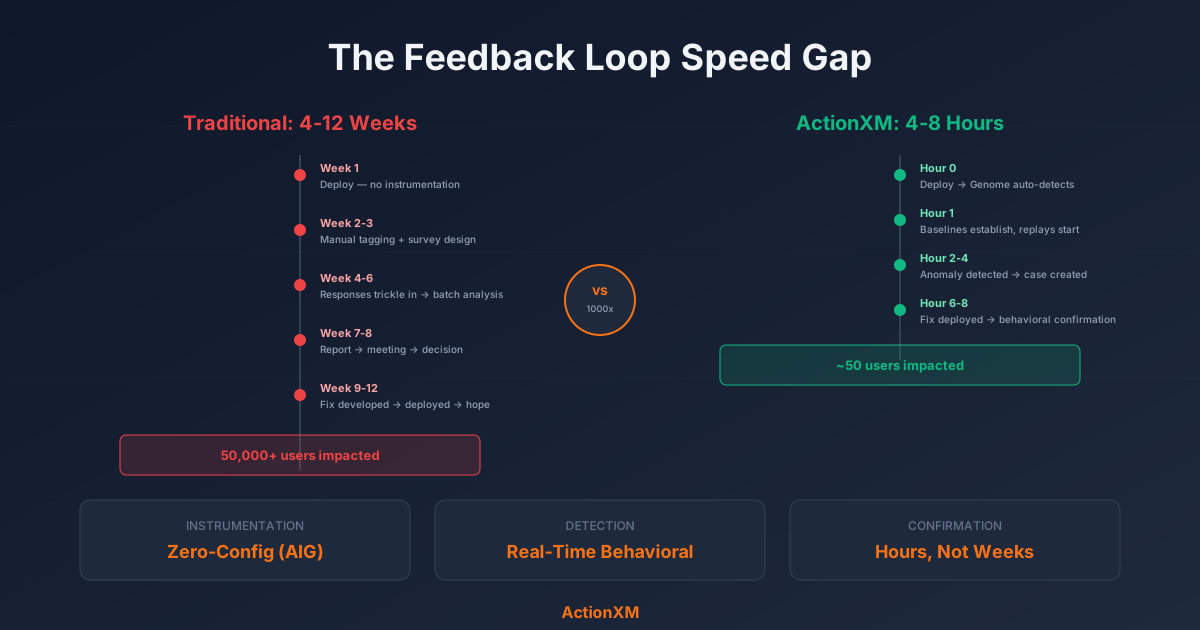
The Traditional Path: 4-12 Weeks
Here’s what the feedback loop looks like with a traditional experience management platform:
The bottlenecks are structural, not operational. Manual instrumentation requires developer time. Surveys require design, approval, and collection time. Analysis requires export and cross-referencing. Each step adds days or weeks.
The ActionXM + AIG Path: 4-8 Hours
Here’s the same scenario with zero-config instrumentation and behavioral analytics:
No manual instrumentation. No survey design. No batch analysis. No meetings to discuss findings. The behavioral signal arrives before a survey could even be deployed.
The 1000x Multiplier
The math behind feedback loop speed is simple and unforgiving.
If your product has 1,000 daily active users and it takes 4 weeks (28 days) to detect and resolve an issue, that’s 28,000 impacted user experiences. At 4 hours to detection, it’s roughly 170.
Every hour of detection delay is a multiplier on customer impact. And the impact isn’t just the immediate frustration — it’s the downstream effects: support tickets, negative word of mouth, churn, and lost revenue.
How Application Genome Closes the Instrumentation Gap
The single biggest bottleneck in traditional feedback loops is instrumentation. Before you can measure anything, someone has to manually tag the elements, configure the events, and deploy the tracking code.
ActionXM’s Application Genome eliminates this bottleneck through a three-stage automated pipeline:
Stage 1: DOM Crawl
The Genome crawler scans every page of your application, building a complete inventory of interactive elements. Buttons, forms, links, inputs, modals, dropdowns — every element that a user can interact with is cataloged.
This scan runs automatically. No developer involvement. No tag management system. No spreadsheet of elements to track.
Stage 2: DOM Diff
When a new deploy lands, the Genome compares the current DOM structure against the previous scan. New elements are identified. Changed elements are flagged. Removed elements are tracked.
This diff is triggered by CI/CD webhooks or scheduled scans. The result: every deploy is automatically instrumented. No tagging backlog. No “we forgot to track the new feature.”
Stage 3: AI Synthesis
Each new or changed element is classified using AI — button, form field, navigation link, CTA, error message. This classification determines what behavioral signals to track and what baselines to establish.
The synthesis also identifies the semantic purpose of elements. A “Submit Payment” button on a checkout page is classified differently from a “Learn More” link on a marketing page. The Genome understands context, not just HTML structure.
Auto-Deploy Detection
One of the most powerful features of this pipeline is automatic deploy detection. When ActionXM’s Application Genome detects a DOM diff that exceeds a significance threshold, it knows a deploy happened.
This triggers:
- Baseline reset for changed elements — new behavioral baselines start accumulating immediately
- Anomaly sensitivity increase — the system watches changed pages more closely for the first 24 hours
- Deploy annotation — CX Advisor correlates any anomalies with the specific deploy, making it trivial to identify regression causes
Without this, deploy correlation requires manual annotation (“We shipped v2.4.1 at 3pm Tuesday”) and manual analysis (“Was the NPS drop related to the deploy?”). With auto-deploy detection, the correlation is automatic and precise.
Three Real-World Scenarios
Scenario 1: Checkout Regression
Traditional path: A CSS change in the checkout flow causes the “Place Order” button to render off-screen on iPhone 12 and 13. Users scroll down, can’t find the button, and abandon. Survey results 3 weeks later show “checkout was confusing” but nobody can reproduce the issue because it’s device-specific.
ActionXM path: Application Genome detects the DOM change. Within 2 hours, frustration scores spike on iOS Mobile sessions in the checkout flow. Session replay shows users scrolling past the fold looking for a button that’s not visible. Case auto-created with device breakdown showing iPhone 12 and 13 exclusively affected. CSS fix deployed by end of day.
Scenario 2: Pricing Page Confusion
Traditional path: A pricing page redesign launches with a new tier structure. NPS surveys show a slight decline 4 weeks later, but the connection to the pricing change isn’t obvious because the survey doesn’t ask about pricing specifically.
ActionXM path: Genome detects extensive DOM changes on the pricing page. Behavioral monitoring shows a 3x increase in toggle switching between tiers, extended scroll depth, and elevated quick-back rates. CX Advisor identifies “pricing page engagement anomaly” and correlates it with the deploy. A contextual micro-survey is triggered for users who exhibit confusion patterns, asking specifically about pricing clarity.
Scenario 3: New Feature Adoption Failure
Traditional path: A new “Quick Save” feature launches but adoption is 2% after a month. The product team doesn’t know if users aren’t finding it, don’t understand it, or don’t want it. A survey is designed, approved, and launched to investigate. Results arrive in 6 weeks.
ActionXM path: Genome classifies the new “Quick Save” button and tracks interactions. Within 48 hours, behavioral data shows the button receives clicks (users are finding it) but triggers zero follow-through (they’re not completing the save action). Session replays reveal the save confirmation modal has a confusing dual-button layout — “Save” and “Save & Close” look nearly identical. The UX is clear; the fix is obvious.
Behavioral Confirmation: Closing the Full Loop
Detection speed is only half the equation. The other half is confirmation — knowing that your fix actually worked.
Traditional platforms can’t confirm quickly. You deploy a fix, wait for the next survey cycle, hope enough responses come in from the affected segment, and compare to the previous period. This takes weeks.
ActionXM provides behavioral confirmation within hours of a fix deployment:
- Application Genome detects the new deploy (DOM diff)
- Behavioral baselines are compared (frustration score before fix vs. after fix)
- CX Advisor reports (“Frustration score on checkout/payment returned to baseline after deploy v2.4.2”)
The loop isn’t closed when the fix is deployed. It’s closed when the behavioral data confirms the fix worked. ActionXM provides that confirmation on the same timeline as the detection — hours, not weeks.
Measuring Your Own Feedback Loop Speed
To understand where your organization falls on the speed spectrum, measure these four intervals:
1. Deploy-to-Instrumentation Time
How long after a feature ships before tracking is in place? If the answer is “days” or “it depends on the dev team’s backlog,” that’s your first bottleneck. With Application Genome, this drops to zero.
2. Instrumentation-to-Detection Time
Once tracking is live, how long before an issue is surfaced? If you rely on survey batches and weekly reports, this is measured in weeks. With behavioral monitoring and CX Advisor heartbeats, it’s measured in hours.
3. Detection-to-Action Time
When an issue is surfaced, how long before someone acts on it? If cases require investigation, reproduction, and context gathering, this adds days. With behavioral cases that include session replays and element-level detail, action can begin immediately.
4. Action-to-Confirmation Time
After a fix is deployed, how long before you know it worked? If you’re waiting for the next survey cycle, this is weeks. With behavioral baselines, it’s hours.
The total of these four intervals is your feedback loop speed. The goal isn’t perfection — it’s compression. Every bottleneck you eliminate brings your loop closer to real-time.
The Compound Effect of Speed
Fast feedback loops don’t just catch issues sooner. They change how your organization operates:
- Engineers ship with confidence because they know they’ll hear about problems within hours, not months
- Product managers iterate faster because adoption data arrives in days, not quarters
- CX teams become proactive because they detect issues before customers report them
- Support costs decrease because fewer customers experience issues long enough to file tickets
- Customer trust increases because problems are fixed before they become patterns
The difference between a 4-hour feedback loop and a 4-week feedback loop isn’t just speed. It’s the difference between a CX program that reacts to damage and one that prevents it.
Closing the Gap
If your feedback loop today is measured in weeks, you can’t compress it to hours by optimizing within the existing framework. Faster surveys are still surveys. Better dashboards are still dashboards. The structural bottlenecks — manual instrumentation, batch collection, meeting-driven analysis — remain.
Closing the gap requires a different architecture:
- Zero-config instrumentation (Application Genome) eliminates the deploy-to-measurement delay
- Real-time behavioral monitoring (DXA) eliminates the collection-to-detection delay
- Proactive AI analysis (CX Advisor) eliminates the detection-to-surfacing delay
- Behavioral case triggers (Cases) eliminate the surfacing-to-action delay
- Behavioral baselines (AIG) eliminate the action-to-confirmation delay
Each layer compresses a different segment of the loop. Together, they reduce a 4-12 week cycle to 4-8 hours.
That’s not an incremental improvement. That’s a structural transformation in how customer experience feedback works.